This topic is concerned only with the default groups created by DeltaV software. It is possible to create additional Windows groups, but this is not necessary and not recommended for use with DeltaV software. When you select the New User dialog opens.
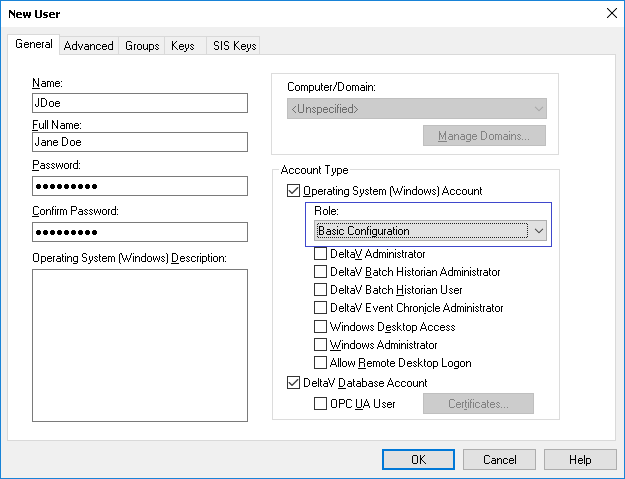
By default, the Operating System (Windows) Account and DeltaV Database Account check boxes are selected.
Once a user account exists, you can modify the account type in DeltaV User Manager by double-clicking the account name to access the user account properties.
To ensure proper tracking of security events, the software creates a record in the Windows Events Viewer's Application log when a user is added or deleted with the DeltaV User Manager application.
You do not assign DeltaV users to Windows groups directly. When you create a user in the DeltaV User Manager the selections you make for each user determine the Windows groups to which the user is assigned. The following tables show how the New User dialog selections put users in Windows groups that standard DeltaV software created during DeltaV software installation.
The DeltaV installation creates other groups to support Emerson software that can be purchased and installed separately.
|
New User dialog check box... |
Adds user to this Windows group in a workgroup environment |
Adds user to this Windows group in a domain environment |
These users... |
|---|---|---|---|
|
The following Windows account sub-type check boxes each assign a user to an additional Windows group |
|||
|
Operating System (Windows) Account and DeltaV Database Account |
DeltaV |
Domain DeltaV |
Can log on to Windows and the DeltaV system. |
|
DeltaV Administrator |
DeltaV Admins |
Domain DeltaV Admins |
Can perform privileged DeltaV operations and have access to the Windows Desktop. |
|
DeltaV Batch Historian Administrator |
DVBHisAdmin |
Domain DVBHisAdmin |
Have unrestricted access to DeltaV Batch Historian data. |
|
DeltaV Batch Historian User |
DVBHisUser |
Domain DVBHisUser |
Have restricted, read-only access to DeltaV Batch Historian data. |
|
DeltaV Event Chronicle Administrator |
DVECAdmin |
Domain DVECAdmin |
Have access to the Event Chronicle Administration tool. |
|
Windows Desktop Access |
DeltaV Access |
Domain DeltaV Ax S |
Have access to the Windows Desktop. |
|
Windows Administrator |
Administrators |
Domain Admins |
Are allowed access to Windows System utilities. |
|
Allow Remote Desktop Logon |
Remote Desktop Users |
Domain DeltaV TSUsers |
Are allowed to log in remotely. |
|
DeltaV Database Account |
DeltaV |
Domain Deltav |
Are given a DeltaV account allowing the user to log on to the DeltaV system. |
DeltaV User Roles
In addition to the check boxes, the New User dialog has a Role drop-down field that contains two options. The following table lists the options and the Windows group associated with them.
|
Selecting this role… |
Adds user to this Windows group in a workgroup environment |
Adds user to this Windows group in a domain environment |
These users... |
|---|---|---|---|
|
Basic Configuration |
DeltaV Basic Configuration |
Domain DeltaV Basic Configuration |
Have restricted access to DeltaV applications and their folders. |
|
Basic Operator |
DeltaV Basic Operator |
Domain DeltaV Basic Operator |
Have restricted access to DeltaV applications and their folders. |
Be aware that NTFS permissions and Group Policies can disallow privileges granted through DeltaV keys. For example, if a user is granted the Can Configure or Can Download key but is prevented from accessing the DeltaV Explorer because of NTFS permissions associated with that user's role, downloading and configuring privileges are disallowed.