The DeltaV system stores your control strategy in a database. You can have multiple databases created but only one is the active (currently used) database.
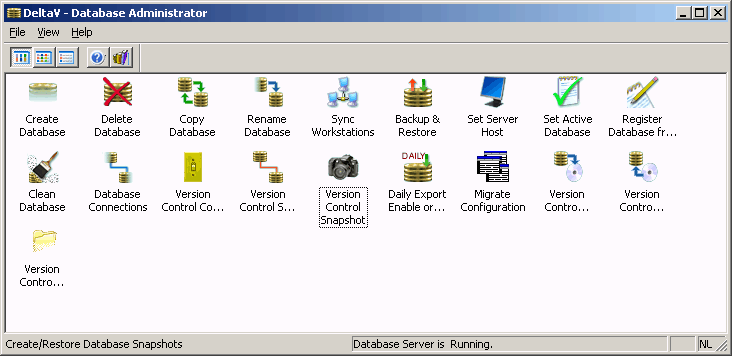
The Database Administrator contains tools for managing your DeltaV databases. These tools include:
Create Database - Creates a persistent database that is used primarily to store configuration information
Delete Database - Deletes a database
Copy Database - Copies an existing database
Rename Database - Renames a database
Synchronize Workstations - Specifies the active database in the registries of other workstations in the system
Backup and Restore - Backs up a database and restores a backup version of a database (into the current active database)
Set Server Host - Specifies the workstation on which the DeltaV Database Server resides. This setting is used by the database administrator tools in those dialogs that provide a list of registered databases on a workstation (such as delete, copy, move, monitor, backup, and set active database)
Set Active Database - Specifies the database to be used as the active database
Register Database from Files - Registers (and deregisters) the database on the database host
Clean Database - Rolls back transactions that have terminated abnormally. This tool also enables you to perform an extended clean which consolidates and defragments the selected database in addition to rolling back transactions that have terminated abnormally
Database Connections - Displays the active database connections
Daily Export Enable or Disable - Provides the configuration and enabling (or disabling) of a daily export of the DeltaV database
Migrate Database - Migrates an older version of the DeltaV database to the current version. Used specifically after upgrading DeltaV software.
Daily PowerUp Directory Backup - Enables a daily backup of the download scripts in the \POWERUP directory.