In the DeltaV Diagnostics system, you can access information about users who are logged on through remote sessions. Those with sufficient privileges can send messages to other users and disconnect or log off other users. To access the diagnostics for remote clients, click . (You can also access the remote client diagnostics from DeltaV Diagnostics by selecting the workstation that is the remote client server, right-clicking, and selecting Remote Client Diagnostics.) The Remote Clients dialog appears, as shown below:
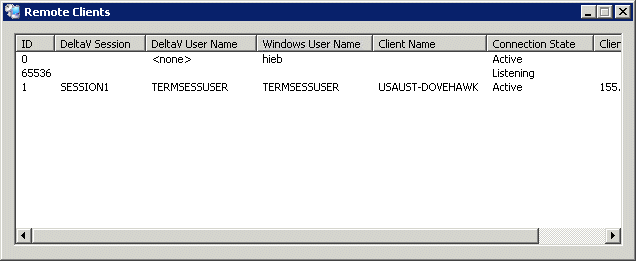
As an administrator with the proper access privileges, you can right-click a remote session and select from the following options:
The column headings in the Remote Clients dialog are as follows:
ID - A numerical identifier. An ID with a very high number, such as 65536 in the above example, is used for Windows server listener sessions that wait for requests for new client connections. No user is logged on to a listener session.
DeltaV Session - The session name, as identified in the DeltaV Explorer hierarchy.
DeltaV User Name - The name of the DeltaV User logged on to the session.
Windows User Name - The Windows user name of the user logged on to the session.
Client Name - The name of the remote node logged on to the session.
Connection state - One of 10 possible states:
Active - A user is logged on to the server
Connected - The server is connected to the client.
Connecting - The server is in the process of connecting to the client.
Shadow Connection - The server is shadowing another
Disconnected - The sever is active but the client is disconnected.
Idle - The server is waiting for a client to connect.
Listening - The server is listening for a connection.
Resetting WinStation - The server is being reset.
WinStation Error - The server is down due to an error.
Initializing - The server is initializing.
Client IP Address - The IP address of the client node