Use this topic to configure the user accounts for domain-to-domain communication between the DeltaV Remote Workstation and the DeltaV system to which you are connecting
This configuration is based on the two domains (the DeltaV domain and the Remote domain) having a two-way domain trust established. If a two-way trust is not established, do that first, then configure the users and groups as described in this topic.
While it is possible to configure the two domains with a one-way trust (either way) or no trusts, those configurations result in needing to create local accounts on one or both sides (DeltaV or Remote). This negates the user/group management and security benefits of having domains and two-way trusts.
DeltaVAdmin account
The DeltaVAdmin account is used to run the DeltaV services on the DeltaV workstations. This account is also used for DCOM communications between DeltaV workstations (for example, when running DeltaV Diagnostics or any Engineering Tool application).
When connecting two domains (remote domain and DeltaV domain), the DeltaVAdmin account from the DeltaV domain must be given local administrator privileges on the Remote Workstation. This is normally accomplished after establishing Domain Trusts between the two domains and then adding the DeltaV domain’s DeltaVAdmin account to the Remote Workstation’s local (workstation) Administrators group.
The DeltaV group on the Remote Workstation's domain
When connecting two domains (remote domain and DeltaV domain), the remote domain’s Domain DeltaV group must be added to the DeltaV domain’s DeltaV group. This is normally accomplished after establishing Domain Trusts between the Remote Workstation’s domain and the DeltaV system’s domain.
Other groups for access to DeltaV
Depending on the access required, the remote user might need membership in other groups, for example, the DVBHisUser group for DeltaV Batch Historian access. Add the user to the Domain DVBHisUser group in the remote domain and add that group to the DeltaV domain’s DVBHISUser group. Follow this pattern for all needed groups.
Users in DeltaV User Manager
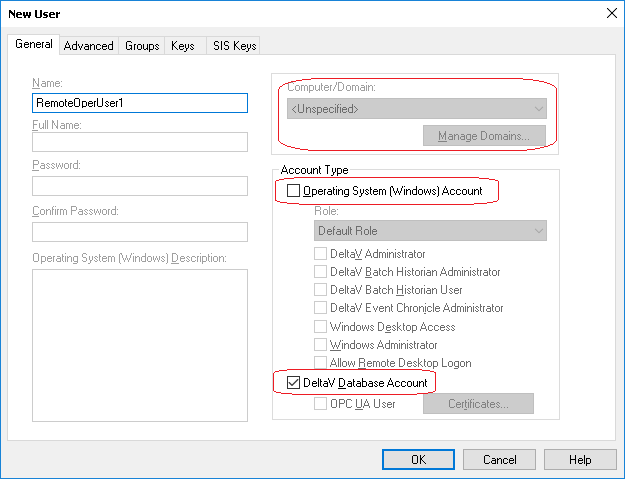
You must add the Remote Workstation’s users as DeltaV database accounts through DeltaV User Manager (deselect the Windows Operating System Account option and set the Computer/Domain field to Unspecified) and apply the needed DeltaV keys and areas/nodes.
Users for downloading/uploading the Remote Workstation
The Remote Workstation’s system ID is stored in the registry of the Remote Workstation. This value must be read before downloading or uploading the Remote Workstation to verify the workstation should be downloaded/uploaded.
Therefore, the current user logged into Windows must be a user with administrator rights on the Remote Workstation. This is normally accomplished using Domain Trusts and adding the user (or the group the user is a member of) to the local (workstation) Administrators group on the remote domain.Distributing system setup data to all workstations
All workstations, including Remote Workstations, receive the DeltaV system setup data in an encrypted format. This distribution ensures configuration changes are kept synchronized between all workstations in the system.
In order to do this, the DeltaVAdmin account password on the DeltaV system must match the DeltaVAdmin account password on the remote system. If you change the DeltaVAdmin account password on one side (the Remote side, for example), you must match that change on the other side (the DeltaV system).