DeltaV system security > DeltaV Firewall IPD

Bypassing the firewall IPD

In order to send an unlock command to a logic solver such as a CSLS or SLS 1508, you must first bypass the firewall IPD. You can use either the front-panel pushbutton or a set of discrete input contacts on the front panel to bypass the firewall IPD. This topic explains how to use the front-panel pushbutton to bypass the firewall IPD. Refer to KBA NK-1600-0290 for information on using the discrete input contacts.
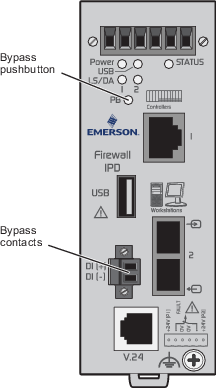


  1. Press the pushbutton on the primary firewall IPD, release the pushbutton, and wait for two seconds.
  2. Press the pushbutton again, release it, and wait for two seconds.
  3. Press the pushbutton a third time and release it.
    After about 10 seconds, the relay contacts open and the Status LED flashes on and off red. The firewall IPD remains bypassed for 30 minutes. After 30 minutes, the firewall IPD returns to the blocking state, the Status LED turns off, and the relay contacts close.

    When the firewall IPD is in the blocking state, the logic solver can receive lock commands but cannot receive unlock commands.