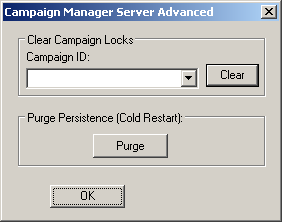
Advanced functions include clearing locks and purging persistence in the campaign.
To perform the advanced functions, select a campaign from the list and click the appropriate button.
-
Clear- Clears all Edit Locks on the campaign
and all Edit and Control Locks on all batches within the selected campaign.
-
Purge- Removes the campaign journal files and
clear the Campaign Manager’s current state. This is equivalent to a cold
restart of the Campaign Manager Server since the last known state of the server
is cleared. A campaign can only be purged when the campaign and its batches are
not active and all batches in the campaign have been removed from the Batch
Executive’s batch list.