In this section you will learn how to use DeltaV Operate in configure mode to create an operator picture (TANK101) for the example process system.
It is important to understand the operating environment for a DeltaV process system before you start creating pictures to be used in that environment. The DeltaV Operate application functions in two modes:
-
Configure mode - used to create pictures
-
Run mode - used to run pictures in the DeltaV Operate application
Let's start by taking a look at the standard DeltaV operator desktop, as seen in the DeltaV Operate application in run mode.
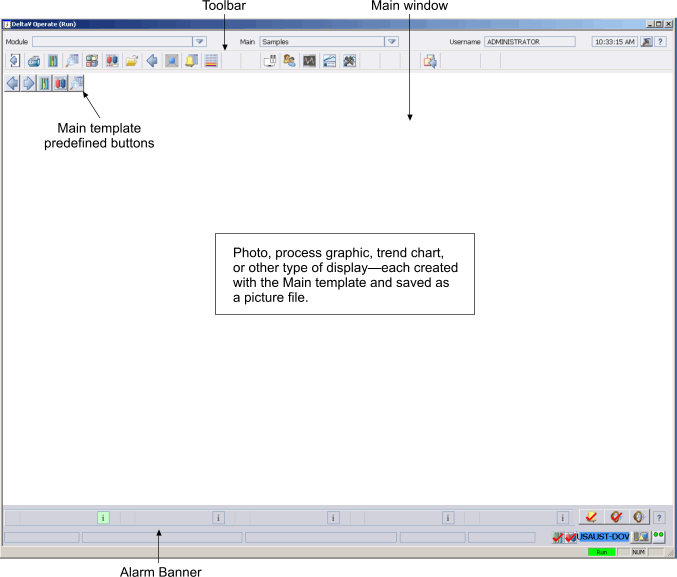
This desktop was designed specifically for use with DeltaV process systems. It is made up of three sections: the Toolbar, the main window, and the Alarm Banner. The Toolbar buttons provide single-click access to important pictures, directories, and other applications.
The Alarm Banner at the bottom of the desktop also has important predefined functions. The large buttons are used to notify the operator of the highest priority alarms that have been activated. When an alarm is tripped, the name of the associated control module (such as XV-101) is displayed on one of the alarm buttons. By clicking one of these buttons, the operator goes directly to the appropriate process graphic for taking action on that alarm (the primary control picture or the faceplate). The Alarm Banner also includes a node monitor button to enable operators to monitor the current status of controllers and workstations.
You may remember that we assigned a primary control picture to each control module as one of the finishing steps. Modules created from library templates have predefined faceplates. A little later you will learn more about the Alarm Banner and how to acknowledge alarms.
The main window is where the operator views a main picture, which is typically a process graphic that provides a view of the process or equipment. A main picture is any picture created using the main template. The main template has some predefined features, such as a small toolbar (with five buttons) in the upper left corner. The template also contains some picture commands that are required by the DeltaV environment.
Even in relatively small process systems, there are likely to be a number of main pictures. Each main picture is created and saved as a picture file with its own unique name.
The most important thing to remember about main pictures is that they must start from the predefined template named main. Only subordinate pictures, such as pop-up messages to operators, should be created without using the main template. If you create a new picture file from scratch or use a different template as a basis, much of the DeltaV Operate environment will not work.