Links enable you to display real-time and system data in the DeltaV Operate application in run mode. There are several different types of links. The links introduced in this tutorial are datalinks and trend links.
In configure mode, properties are parameters of objects that you can alter using tools, menu commands, and dialog. Dynamic properties are object parameters that change in DeltaV Operate run mode based primarily on changes in database values. (For example, a tank may change color as it fills, that is, as the current value of the level indicator changes.)
A parameter reference identifies the database field that supplies data to a link or dynamic property. The parameter reference syntax is
where tag is usually in the form
module/function block/parameter
is the parameter reference identifying the current value of the setpoint field (parameter) in the PID1 function block of the FIC-101control module.
If you enter only the tag (for example, FIC-101/PID1/SP), DeltaV Operate fills in the default node of DVSYS and uses a default current value field of either F_CV (floating point current value) or A_CV (ASCII current value), based on the type of data (Numeric or Text) you specify for the link. If the tag does not exist, you are asked if you want to use it anyway.
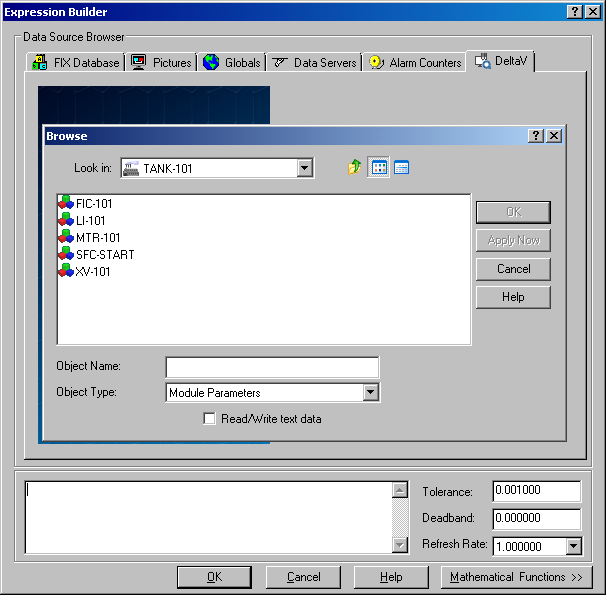
 In most dialogs that require you to enter a parameter reference, a
browser is available to help you search through the network for a particular
parameter reference. To access the browser, click the
ellipsis button next to the
Source field.
In most dialogs that require you to enter a parameter reference, a
browser is available to help you search through the network for a particular
parameter reference. To access the browser, click the
ellipsis button next to the
Source field.
The Data Source Browser from the Expression Builder box appears first. Then the Browse dialog appears after you select Browse DeltaV Control Parameters. (The Browse dialog may take a few seconds to appear the first time you call it.)