Assign TANK-101 to the Continuous Historian subsystem

Assigning an area to a Continuous Historian subsystem allows the subsystem to collect historical data from the modules in that area. Assigning an area to the Alarms and Events subsystem allows the subsystem to collect alarms and events. Perform the following steps to assign TANK-101 to both subsystems:
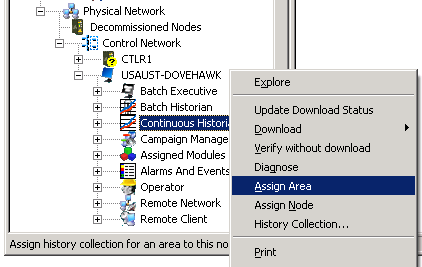
  1. Open or restore DeltaV Explorer.
  2. Navigate to the workstation where the events and process data for the area will be stored.
  3. Double-click the workstation to expand its contents.

    A number of icons, including an Operator icon, an Alarms and Events icon, a Continuous Historian icon, and a Batch Historian icon, are listed under the workstation.

  4. Select Continuous Historian.
  5. Right-click, select Assign Area, and then browse for TANK-101.

  6. Click OK in the Browse dialog.
  7. Select Alarms and Events.
  8. Right-click, select Assign Area, and then browse for TANK-101.
  9. Click OK in the Browse dialog.

    A confirmation dialog instructs you to download the workstation's setup data and then log off and back on to add the area to the Alarm Banner. Click Yes in this dialog.

    TANK-101 appears in the Contents View for the Continuous Historian and Alarms and Events subsystems. The Continuous Historian subsystem will collect historical data from the modules in plant area TANK-101, and the Alarms and Events subsystem will collect alarms and events in plant area TANK-101.

    The next step is to enable history collection on the workstation.