Creating a Sequential Function Chart > Creating the SFC module

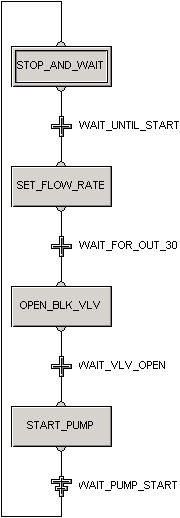
Complete the Sequential Function Chart diagram

  1. Repeat the procedures for adding steps and transitions using the information in the following table. (Drag Step and Transition icons from the palette or use the Sequence item on the palette to automatically add multiple steps and transitions in one operation. Use a Termination icon for the last transition.)
    Tip

    On the View tab, in the Diagram group, click Diagram Preferences, and then check Display Grid and Snap to Grid to help you line up the SFC objects on the diagram.

    Note

    In the example, all Action Types are Assignment; all Action Qualifiers are Pulse, except for Action 2 in Step 2, which has an Action Qualifier of Non-stored. (The reason is that if Action 2 Step 2 were Pulse, it might not get set because it waits until the actual mode is Auto. It would fail on the first try and never be set.)

  2. Use the Connect Mode tool to connect the steps and transitions in order.
  3. Change the step and transition names by right-clicking, selecting Rename, and then typing the name listed in the following table. Be sure to read the table footnote for important information about statement syntax.

    Step/Transition

    Name

    Action Text or Condition Text*

    Description

    S1

    STOP_AND_WAIT

    'SP':='SFCCTRL:IDLE';

    Inhibits startup sequence (until the user changes the SP to START).

    T1

    WAIT_ UNTIL_START

    'SP'='SFCCTRL: START'

    Waits until operator selects START. If SP is START, proceeds to the next step.

    S2

    SET_FLOW_RATE

    A1: '//FIC-101/PID1/MODE.

    TARGET' := AUTO;

    A2: '//FIC-101/PID1/SP': = 50;

    (Action Qualifier is Non-Stored.)

    Sets the flow loop to AUTO.

    Sets the setpoint at 50 GPM.

    T2

    WAIT_FOR_OUT_30

    '//FIC-101/PID1/OUT' > 30

    Waits for the regulatory valve to be 30% open.

    S3

    OPEN_BLK_VLV

    '//XV-101/DC1/SP_D':=1;

    Opens the block valve.

    T3

    WAIT_VLV_OPEN

    '//XV-101/DC1/PV_D'=1

    Confirms that the block valve is open.

    S4

    START_PUMP

    '//MTR-101/DC1/SP_D' :=1;

    Starts the pump.

    T4

    WAIT_PUMP_START

    '//MTR-101/DC1/PV_D'=1

    Confirms the pump started.

    * IMPORTANT: Assignment actions use the assignment operator ( :=) and end with a semicolon (; ). Transitions use an equals sign (=) to indicate that when the condition is true, the next step should be made active. Parameter values are enclosed in single quotes.

    The finished SFC looks like this.