Creating a new module from scratch - overview

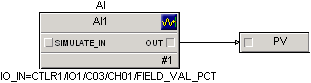
Connect the OUT parameter to the PV parameter

  1. Click anywhere in the background of the Diagram view. (This puts the focus on the diagram so that the next step works.)
  2. Click and hold the Out connector on the AI block.
  3. While holding down the left mouse button, draw a line from the Out parameter on the AI block to the PV parameter.

The pencil icon changes to a * when you are over the right spot for making the connection.

Tip

If you want to rearrange the diagram, click one of the function blocks and move it. The connector line moves and resizes automatically.

Your finished diagram should look like this: