Configuring other workstations

Create a workstation configuration file

If you do not create a workstation configuration file immediately after adding workstations to the system in DeltaV Explorer, you will need to create one later.

Perform the following steps on the ProfessionalPLUS workstation to create a workstation configuration file. You can save the file to removable media or to an accessible network location.
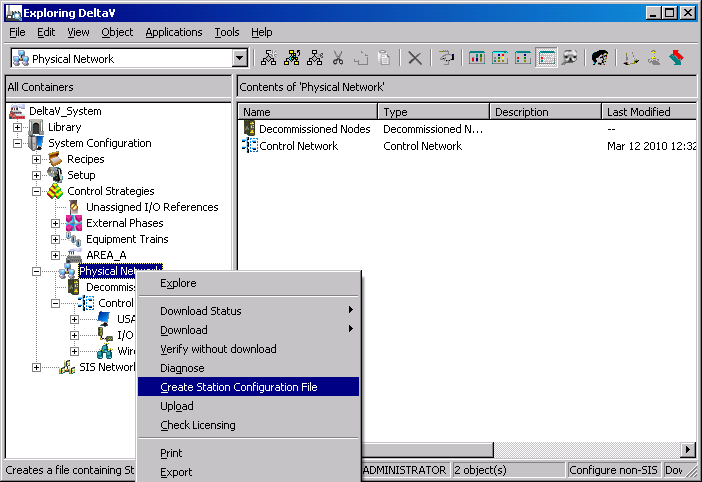
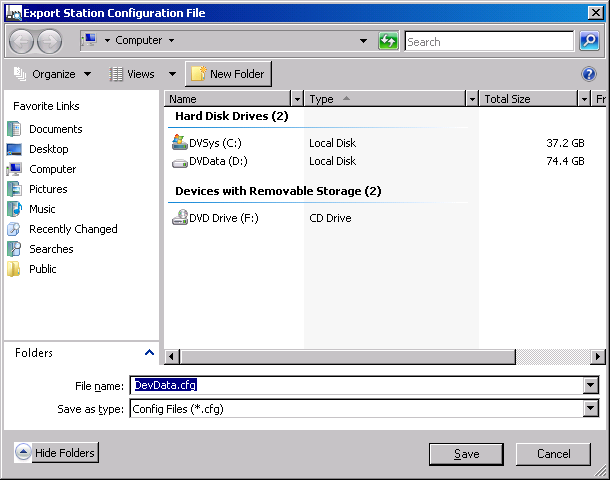
  1. Open DeltaV Explorer if it is not already open.
  2. Select and right-click Physical Network.

    A context menu appears.

  3. Select Create Station Configuration File from the context menu.

    A dialog appears for you to specify the file name and destination. The default name for the workstation configuration file is DevData.cfg.

  4. Select a location to save the workstation configuration file, and then click Save.