Injecting additional power to S-series I/O

Inject power to I/O when the power source is remotely installed

When the cards requiring additional power are installed remotely from the power source, make a wired connection between the power terminals on the Power/Controller carrier and the Left Extender connected to an 8-Wide I/O Carrier.

It is assumed that the power supplies are installed on a Power/Controller carrier that is installed remotely from the Left Extender and 8-Wide I/O carrier on the same DIN rail.
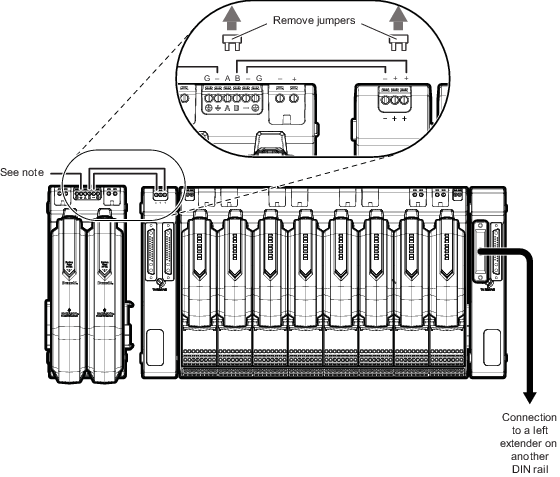
  1. Remove the jumpers from the Power/Controller carrier and from the Left Extender.
  2. Connect terminal B on the Power/Controller carrier to the far right plus (+) terminal on the Left Extender.
  3. Connect the negative (-) terminal adjacent to terminal B on the Power/Controller carrier to the first negative terminal on the Left Extender.
  4. Connect the Power/Controller carrier to the isolated common ground reference.
    Figure: Redundant power injected between remote power supplies and a Left Extender


    Note: Connect DC common to DeltaV DC ground. Refer to the DeltaV Power and Grounding manual for more information on grounding control systems.