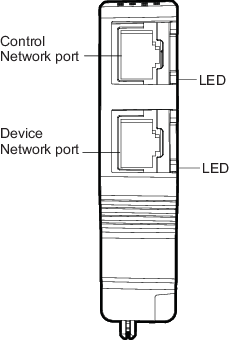
The Dual Universal Carrier houses a primary and secondary Ethernet
Isolation Port (EIP). Each EIP consists of a Control Network port for
connections to the DeltaV Area Control Network and for Ethernet I/O Cards, a
Device Network port for connections to the Device Network.
| LED color and pattern | Description and corrective action |
|---|---|
| Flashing green | The link is established and active Ethernet traffic is being transmitted and received. This is the normal operating condition. |
| Solid green | The link is established, but no Ethernet traffic is occurring. This verifies the physical wire and connection integrity. Also occurs for a short time at power up. Verify that both the Device Network Port and EIOC are fully seated. Check to see if the Ethernet network has an active device powered and connected to the Device Network. |
| Off | The Device Network port is not physically connected, neither EIOCs are present, or both EIOCs are unpowered. Verify that at least one EIOC is installed and powered. Ensure that the connection back to the Ethernet switch is correct and that the switch is powered. |