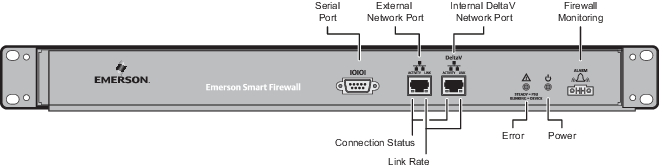
| LED | Meaning |
|---|---|
| Connection status indicator (LED on the left side of each network port) |
Steady green: good link. Unlit: the device on the other end of the cable is not powered up or the cable is bad or over 100 meters long. You can confirm the quality of the cable by verifying the LEDs on the adjacent port work with the same cable and end device or by testing the cable. |
| Link rate indicator (LED on the right side of each network port) |
Steady amber: a 100 MB/s link is established. Unlit: a 10 MB/s link is established. |
| LED | Meaning |
|---|---|
|
Error indication
Steady = PSU |
Red: internal Smart Firewall hardware failure. Error red and power green: only one power cord is connected. The alarm contact TTL output goes to a low state under these conditions. |
|
Power indication |
Steady green: the firewall is powered by either or both AC inputs. Power green and error red: only one power cord is connected. The alarm contact TTL output goes to a low state under this condition. |