Specifications
The DeltaV system supports the 100 Mbit 1-Port Single-Mode Media Converter, the 100 Mbit 1-Port Multimode Media Converter, and the 100 Mbit 2-Port SFP Media Converter, referred to inclusively in this document as the 100 Mbit Media Converters. The 100 Mbit Media Converters convert fiber-optic signals to copper-based signals and copper-based signals to fiber-optic signals. The 100 Mbit Media Converters require the Dual Media Converter Carrier, which mounts on a horizontal DIN rail and accommodates two 100 Mbit Media Converters. The 100 Mbit Media Converters include LEDs that indicate power and connection status.
The 100 Mbit Media Converters primarily provide fiber port connection to the CIOC and the CSLS; however, they can be used for all Control Network applications. The 100 Mbit 1-Port Single-Mode Media Converter and the 100 Mbit 1-Port Multimode Media Converter can be installed in Zone 2 and are suitable for connection to Zone 1 components over the fiber port. Refer to the Installing Your DeltaV Zone 1 Intrinsically Safe Hardware manual in Books Online for information on connecting to the DeltaV Intrinsically Safe system.
| Item | Specification |
|---|---|
| Capacity | One or two redundant 100 Mbit Media Converters |
| Input power (redundant) | +24 VDC ±20% at 12 A maximum |


| LED | Media Converter | Condition | Indication |
|---|---|---|---|
| Fiber-optic port top LED | 100 Mbit 1-Port Media Converters | On | The port is ready for connection. |
| 100 Mbit 2-Port SFP Media Converter | On | An SFP module is inserted in this position. | |
| Fiber-optic port bottom LED | All 100 Mbit Media Converters | On/Blinking | Link/activity is present on this port. |
| RJ45 port LED | All 100 Mbit Media Converters | On/Blinking | Link/activity is present on this port. |
Dimensional Drawings
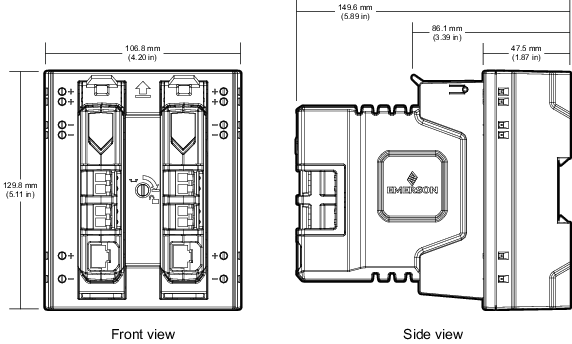
The following figures show the dimensions of the Media Converters and Media Converter Carrier.
Wiring Diagrams
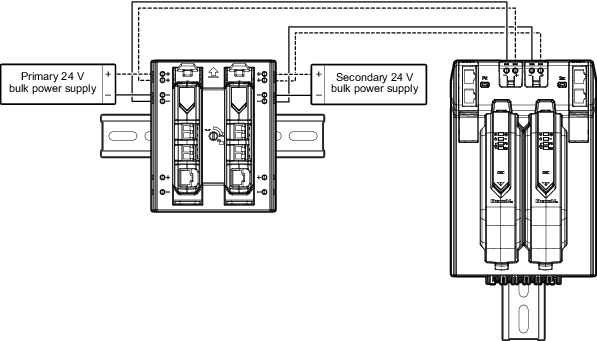
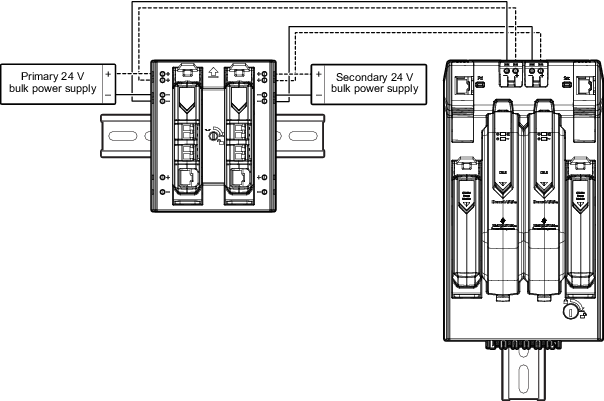
The Media Converters are unmanaged devices and do not generate alarms to the DeltaV system. Emerson recommends daisy-chaining Media Converters with DeltaV managed nodes such as the CIOC and CSLS, which generate power-failure alarms when necessary. The following figures show how to connect power to Media Converters.