When Carriers are installed on separate DIN rails, Left and Right Extenders and cables are used to extend the LocalBus power that runs through the carriers.
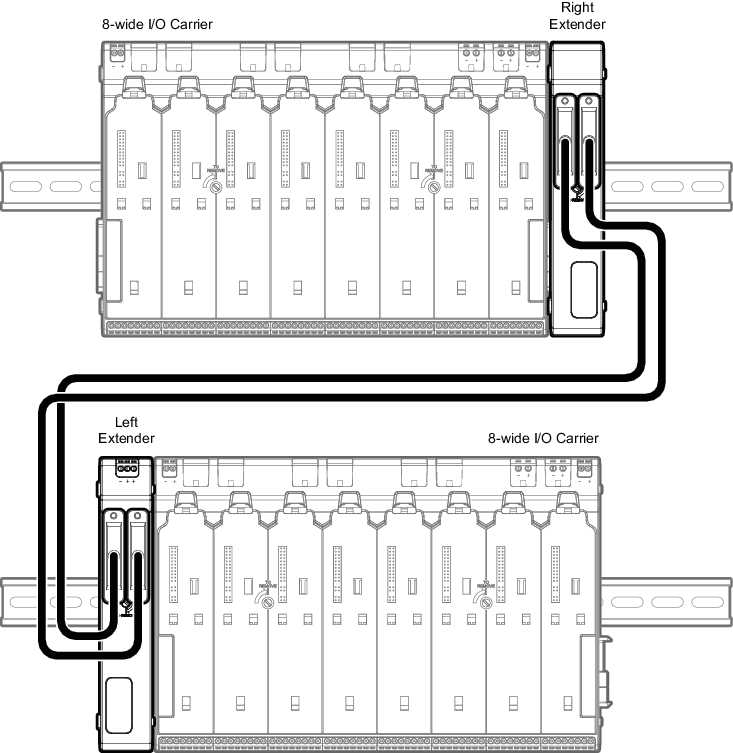
For this procedure it is assumed that at least one 8-Wide I/O Carrier or Power / Controller Carrier is installed on a separate DIN rail from other 8-Wide I/O Carriers. The illustration in this topic shows an 8-Wide I/O Carrier connected to the Right Extender. However, the Right Extender can be connected to a Power / Controller Carrier containing an S-series controller and power supply or a VIM / VIM 2 card and power supply.
- Slide together the connectors on a Right Extender with the connectors on the right side of the last 8-Wide I/O Carrier or Power / Controller Carrier on the first DIN rail.
- Slide together the connectors on a Left Extender with the connectors on the left side of the first 8-Wide I/O Carrier or Power / Controller Carrier on a separate DIN rail.
- Connect the cables between the Left and Right Extenders. Typically, one D-shell cable is used to make the connection; however, two cables can also be used. Connect A to A for single cables and A to A and B to B for dual cables.