The Power / Controller Carrier holds an S-series System Power Supply (24 VDC) and S-series controller or two S-series System Power Supplies (24 VDC) if power injection is required. When a Power / Controller Carrier holds a power supply and controller, it installs to the left of an 8-Wide I/O Carrier. Refer to the DeltaV S-series and CHARMs Hardware Reference manual for information on injecting power to the I/O.
The Power / Controller Carrier installs on a horizontal T-type DIN rail. No tools are required to install the Power / Controller Carrier on the DIN rail. Connectors on both sides of the carrier connect with adjacent carriers to form the LocalBus.
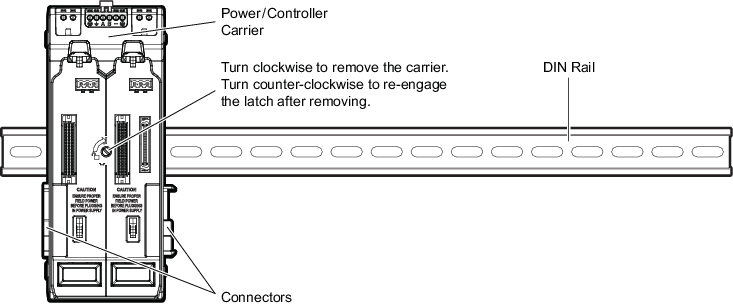
If the carrier has been installed and then removed from the DIN rail, turn the screw on the front of the carrier counter-closewise to reengage the latch.