Install terminal blocks onto an 8-Wide I/O Carrier

Terminal blocks provide screw terminations for field wiring. S-series I/O cards snap onto S-series terminal blocks. Set the key on the terminal block before installing the card on the terminal block.

Simplex terminal blocks can be installed in any slot on the 8-Wide I/O Carrier. Redundant terminal blocks occupy two slots and must be installed in slots 1 and 2, 3 and 4, 5 and 6, 7 and 8. That is, the lower slot in a redundant pair must be an odd number.
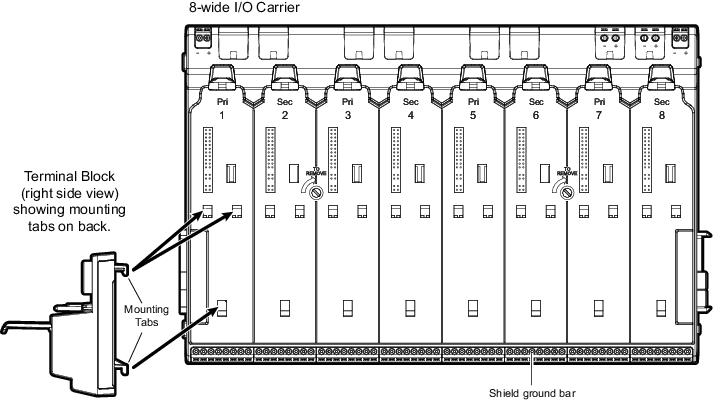
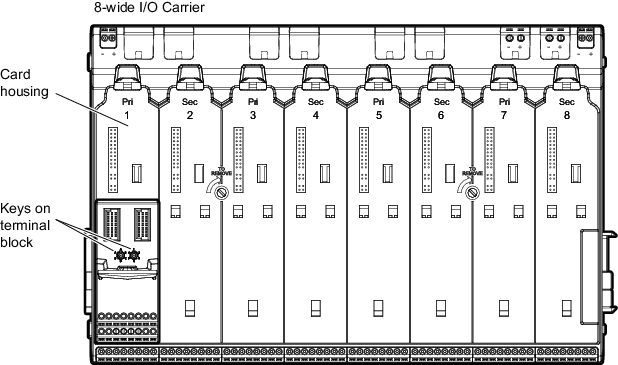
Figure: Installing terminal blocks


  1. Locate the slots for the terminal block on the 8-Wide I/O Carrier. There are three slots for each simplex terminal block.
  2. Locate the tabs on the back of the terminal block. There are three tabs on each simplex terminal block.
  3. Place the tabs on the terminal block in the slots on the carrier and push the terminal block down to lock it into place.


  4. Connect the field wiring to the terminal block.