The DeltaV Controller Firewall is designed to protect DeltaV controllers from Denial of Service (DoS) attacks originating from DeltaV workstations or other computers on the DeltaV Control Network.
The DeltaV system requires a specific hardware and software version of the firewall IPD and a special configuration that includes the packet inspection rules and packet rate limits that have been tested with the DeltaV system. Firewall IPDs ordered from Emerson Automation Solutions are shipped with the supported software and are pre-configured to operate properly with the DeltaV system. To ensure that you have the proper firewall IPD configuration and the correct hardware and software versions, you must purchase the firewall IPD through normal Emerson channels.
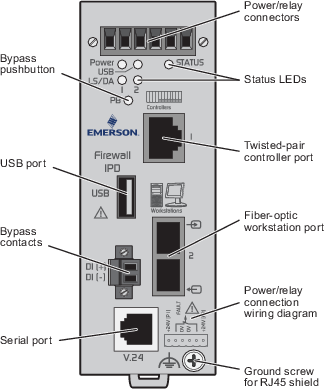
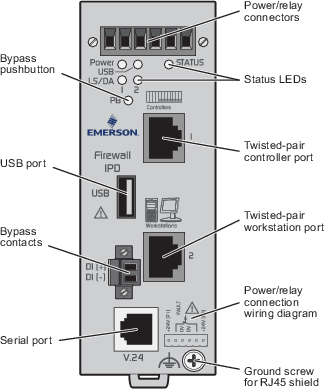
A detachable screw terminal block is used to supply the required 24 VDC system power to the firewall IPD. The firewall IPD is installed close to the controllers on the DIN rail and can use the same system power supply as the controllers. To more tightly control physical access to the firewall IPD, it can be installed on a DIN rail with a 24 VDC power supply in the equipment room. A set of normally closed, potential-free relay contacts, also supplied on the detachable terminal block, monitor proper device functioning.
The ground screw connects to an instrumentation ground to provide a shield ground for the controller and firewall IPD communications cables.
The 10/100 BASE-T Ethernet port labeled Workstations is for DeltaV workstations only. Typically, the workstations are connected to a managed switch such as the DeltaV RM100 Smart Switch, and the switch is connected to the workstation port of the firewall IPD. The 10/100 BASE-T Ethernet port labeled Controllers is for DeltaV controllers only. Typically, the controllers are connected to a managed switch such as the DeltaV RM100 Smart Switch, and the switch is connected to the controller port of the firewall IPD. For controllers that are distributed over wider geographic areas, consider using one firewall IPD for each controller. This is a more secure arrangement because it eliminates the possibility of open switch ports on the controller side.
The firewall IPD must be installed on the Primary and Secondary Control Networks to provide protection on both access ports of the controllers. Among the things to consider when determining the best location in which to install the firewall IPD are:
Do not connect a workstation to the controller side of the firewall IPD and do not connect a controller to the workstation side of the firewall IPD. Incorrect connections will completely bypass firewall IPD protection for controllers.
Refer to DeltaV Firewall IPD Network Examples for examples of how to use the firewall IPD in a Control Network.
The firewall IPD can be managed from a Management station. Refer to the Managing the DeltaV Firewall IPD topic in DeltaV Books Online.