Vibration will cause the vertical carriers to slip down on the DIN rail and disconnect from the carrier above it. Before installing the carriers, install a DIN rail stop to prevent the carriers from slipping. The stop should be at the lowest position on the DIN rail. The DIN rail stop (KJ4010X1-BS1) can be purchased from Emerson.
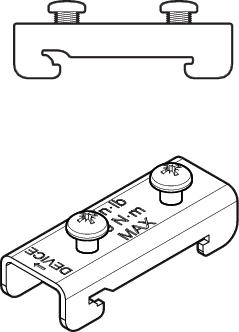
- Be sure the arrow on the front of the stop is pointing upward towards the device. If the arrow is pointing downwards away from the device, the screws on the DIN rail stop could damage pins extending from the device.
- First hook the end with the deeper notch over the DIN rail and then hook the end with the more shallow notch over the other side of the DIN rail.
- Screw the stop onto the DIN rail being careful not to overtighten the screws. Be sure that both sides of the DIN rail stop are properly secured. The torque limits are specified on the DIN rail stop.