Installing Your DeltaV System > Installing the System

Installing the DeltaV Workstation

To install the DeltaV Workstation, connect the workstation components, install the DeltaV System Identifier (one per system), install the printer (if used), and install the UPS (if used). Connect the workstation and its associated peripherals to one power distribution and system ground.

After hardware installation, refer to the DeltaV media pack installation pamphlet for information on installing DeltaV software on the workstation.

To install the workstation
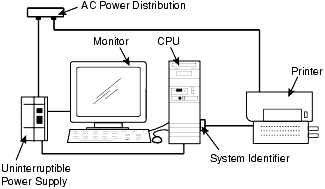
  1. Follow the instructions supplied with your workstation to connect the monitor, keyboard, and mouse to the central processing unit (CPU). Refer to the documentation supplied with your workstation for details on the I/O ports
  2. If the DeltaV label is not installed on your workstation monitor, apply it to the lower right corner of the monitor faceplate.
  3. Install the system identifier on the Universal Serial Bus (USB).
    Figure: Workstation Installation


  4. Refer to the documentation supplied with your printer for hardware installation information.