Verify a neural network model

Under some circumstances you may want to manually verify (test) a neural network model that the application has created. To do so:

  1. Select OptionsExpert (you must be an Expert user to manually verify a neural network model).
  2. Select a Trained Model node in the Hierarchy View.
  3. Select the data to use to verify the model. There are three options you can select from the buttons or from the Trained Model node context menu:
    • Original Data: use the data from which the model was trained.
    • Selected Data: position the green bars on the trend graph to select data to use to verify.
    • File Data: browse to and select a data file saved in the DeltaV Neural data format.
  4. The application opens the Model Verification dialog showing the Actual & Predicted Vs Sample graph, where Actual is the selected set of data shown in blue and Predicted is the output of the trained neural network on the data set in green.

    By viewing this chart, you can see how well the actual and predicted output match each other and therefore how well the trained network works. The root mean square error value in Engineering Units is shown as well.
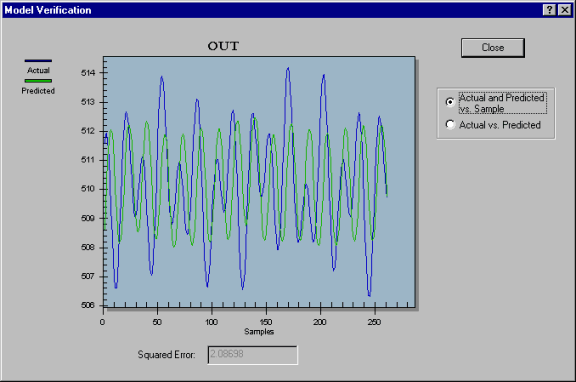
  5. Click the Close button to close the dialog.