Allows you to change item paths or types and to set scaling or range mappings.
-
Start Mirror Configuration by selecting
-
Open the pipe that you want to edit. Mappings will be displayed in the bottom panel.
-
Select the mapping to view or edit by clicking it.
-
You can access the Mapping Properties dialog in any one of three ways:
The General tab
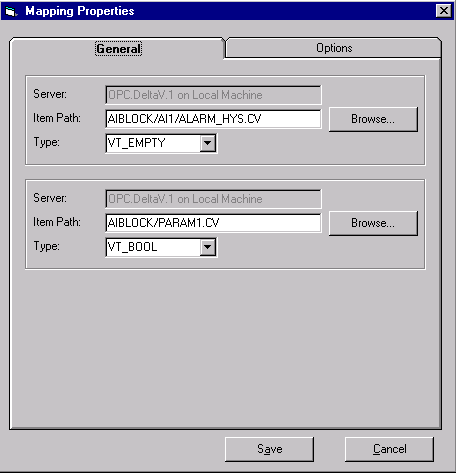
- Item Path -- You can type in a path directly or browse a path by clicking the Browse button on the right.
- Type -- Allows you to specify the desired data type of the item.
You cannot change servers from the General tab.
The Options tab
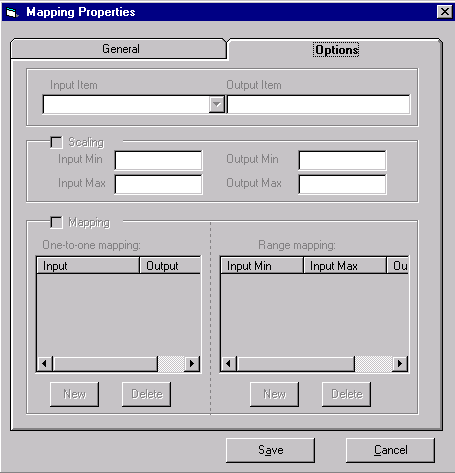
If a pipe is created for transferring data between two different systems, Scaling and Mapping are provided for the mappings in the Options tab to keep pipe data consistent. SOS (Same OPC server on same system) pipes cannot access any of the Options tab functions.
- Input item -- The source
- Output item -- The destination
- Scaling -- Allows input/output scaling if the two systems use different scales
- Mapping -- Maps input item value to output item value
Please be careful when mapping status data such as alarms, modes, quality, etc., between two different systems. OPC Mirror passes the numerical value through without knowledge of the semantics of the value. For example, the status value in PROVOX is usually either 1 or 0, whereas the status value in DeltaV is an enumeration of many values. Simply mapping them together will not produce a meaningful value at the receiving end.
For two-way pipes, you can configure conversion functions for both directions. To select the other direction, use the dropdown list for Input Item to select the other server.
-
For Scaling, it is allowable to have the Min value greater than the Max value. This makes it possible to invert the scaling of a value. Also, if the input value falls outside of the Min/Max range, the output is scaled proportionally.
The One-to-one mapping has a higher precedence than the Range mapping.
When Mapping is used, if an Input has not been defined for the current input value, the value is not sent to the destination and an error is logged in Mirror Diagnostics each time the input changes.