Information that can be obtained from Mirror Diagnostics includes the state of the server connections, the refresh interval, the number of active pipes, the number of item reads/writes during the last second, the errors logged, a list of mappings with bad quality, write errors, and so forth. It also allows you to check pipe mappings, to activate and deactivate pipes, to display pipe statistics, to refresh one or all pipes, to monitor mapped items, and to save messages to a file.
To verify that parameters for clients in the OPC Mirror Subsystem are being updated reliably in DeltaV Diagnostics, confirm that Mirror Diagnostics is not reporting SYNC WRITE errors caused by a lack of access rights. If it is, check the properties for any workstation where a pipe is connected to an OPC server to see if both of the following conditions apply:
- The Restrict online changes to areas assigned to the Alarms And Events subsystem of this workstation option is enabled; and,
- The area specified in the Associate Alarms & Events with Area field is not also associated with the Alarms And Events subsystem for the workstation.
To eliminate the SYNC WRITE errors preventing accurate updating of DeltaV Diagnostics parameters for clients in the OPC Mirror Subsystem, either associate the area specified in the Associate Alarms & Events with Area field with the Alarms And Events subsystem for the workstation or disable the Restrict online changes to areas assigned to the Alarms And Events subsystem of this workstation option.
Mirror Diagnostics will not receive diagnostic information if Mirror Client is not already initialized and running.
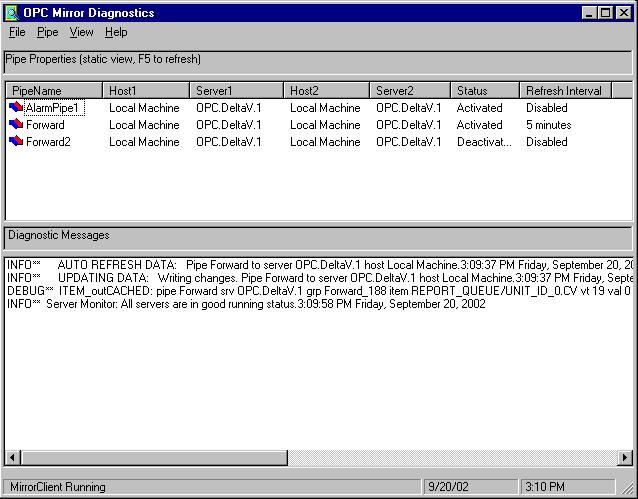
If you are running redundant OPC Mirror clients on a pair of Application Stations, Mirror Diagnostics functions independently on each Application Station. Therefore, you should take the following consideration into account when using Mirror Diagnostics in a redundant environment:
- To monitor information about mapped items in a pipe, you should rely on data reported by the Monitor Mapped Items feature only by Mirror Diagnostics running on the Application Station where the active OPC Mirror client is currently running. Data reported by the Monitor Mapped Items feature in Mirror Diagnostics running on the Application Station where the standby OPC Mirror client is running may not be up-to-date. Also, after a switchover, the last write value and status of slow-changing, static data may not be reported by the Monitor Mapped items feature until the next occurrence of the event.
- Changing settings in Mirror Diagnostics does not carry over to Mirror Diagnostics on the partner Application Station. Settings that can be changed independently on the Application Station where either the active or standby OPC Mirror client is running include the following: