Provides read and write summary data for the time elapsed since the pipe was loaded. The read data includes item values changes per second, number of reads, and value changes. The write data includes the number of pipe writes, the number of successful item writes, and the number of failed item writes.
-
Start Mirror Diagnostics by selecting .
-
Select a pipe by clicking on it.
-
Select from the top menu bar.
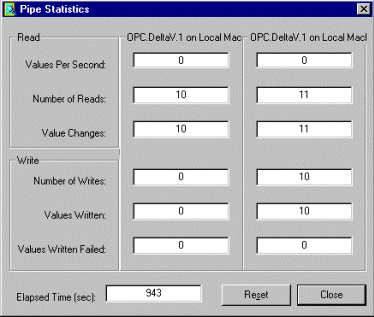
- Values Per Second: The number of item value changes per second.
- Number of Reads: The number of reads on one end of the pipe since the pipe was first loaded or last reset. Each read on one end of the pipe may include 0 or more value changes on the OPC Items in this end of the pipe.
- Value Changes: The number of items that have changed values since the pipe was first loaded or last reset.
- Number of Writes: The number of successful writes on one end of the pipe since the pipe was first loaded or last reset. Each write on one end of the pipe may include 0 or more writes on the OPC Items (Values Written) in this end of the pipe.
- Values Written: The number of successful writes on the individual OPC Items on one end of the pipe.
- Values Written Failed: The number of write failures on the individual OPC Items on one end of the pipe.
- Elapsed Time: The time elapsed since a pipe was loaded.