Allows you to set message filters and to limit the number of messages that will be displayed at one time.
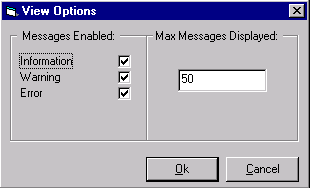
Check the boxes for the type of messages you want to receive. If the box is checked, messages of that type will be received in the message screen. If the box is not checked, messages of that type will not be received.
- Information: Notification messages that include but are not limited to loading, connecting and disconnecting servers, configuration changes, data changes, adding and removing items and pipes, pipe activation and deactivation, pipe refresh, and sync reads.
- Warning: Notification messages that include but are not limited to sync write errors, servers with no pipes configured, and improperly initialized pipes.
- Errors: Notification messages that include but are not limited to server loading, connecting and disconnecting errors, adding and removing item errors, mapping and pipe errors, data changes errors, sync write errors, item conversion errors, and activation and deactivation errors.
Max Messages Displayed
The maximum number of messages that will be displayed in the message screen at one time. The minimum number of messages that can be displayed is 10, the maximum is 1000. When the maximum is reached, the messages will be wrapped. Wrapping means that new messages will replace the oldest existing messages. The older messages are delete from the top of the screen and the new messages are appended at the bottom.
If you are running redundant OPC Mirror clients on a pair of Application Stations, Mirror Diagnostics functions independently on each Application Station. Therefore, changing the View Options setting in Mirror Diagnostics where either the active or standby OPC Mirror client is running does not carry over to Mirror Diagnostics on the partner Application Station. For example, the Max Messages Displayed value could be set to 50 on the Application Station where the active OPC Mirror client is running, while it is set to 75 on the Application Station where the standby OPC Mirror client is running.