|
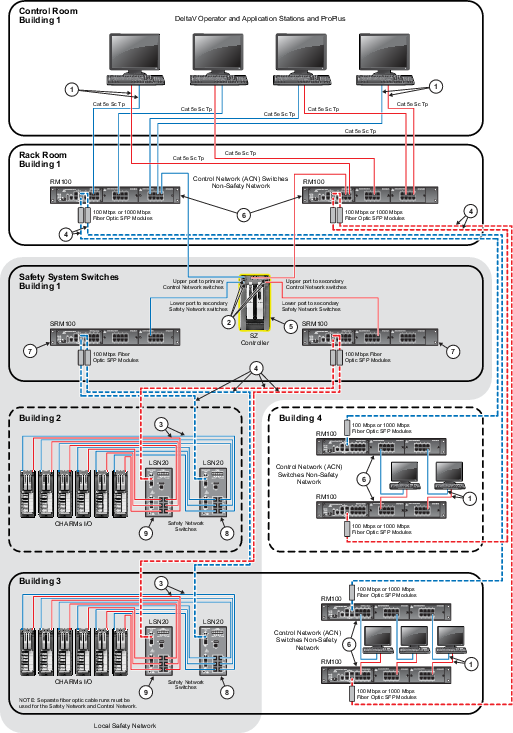
100 meter (maximum) straight-through or crossover cable. To
prevent ground loops, build this cable assembly with a shielded, metal-enclosed
RJ45 connector on one end and an isolated, plastic-enclosed RJ45 connector on
the other end. The metal connector end of this cable assembly must be placed on
the switch and not on the PC.
|

|
100 m (maximum) straight-through or crossover cable. The
shield on the SZ controller's RJ45 connector connects only to a Faraday cage in
the controller; not to the controller's DC ground. Therefore, the RJ45
connectors are floating and the single point of ground is made at the switch to
which the controller is connected. Build this cable assembly with a shielded,
metal-enclosed RJ45 connector on both ends.
|

|
100 m (maximum) straight-through or crossover cable. The
shield on the CSLS RJ45 connector connects only to a Faraday cage in the CSLS;
not to the CSLS DC ground. Therefore, the RJ45 connectors are floating and the
single point of ground is made at the switch to which the CSLS is connected.
Build this cable assembly with a shielded, metal-enclosed RJ45 connector on
both ends.
|

|
Fiber-optic cable must be used for outdoor building to
building communications for immunity to electromagnetic interference caused by
near lightning strikes, for ground isolation between buildings, and to gain
additional distance that goes beyond the 100 meters (328 ft) maximum allowed
for screened twisted pair cabling (ScTP). Both single mode and multimode fiber
optic cable is supported used in conjunction with the DeltaV Smart Switches
|

|
The SZ Controller completely isolates communications
between the DeltaV Control Network and the Local Safety Network. Do not use
external cabling to connect these two independent systems together.
|

|
The RM100 Smart Switches are managed through the DeltaV
console using the Network Device Command Center.
|

|
The SRM100 Safety Switch cannot be managed through the
Network Device Command Center. For network diagnostics for these switches, you
must attach an optional serial cable to the serial port of the safety switch
and use an application such as Hyper-terminal to access the switch information.
No configuration of the safety switch is possible though the serial port. The
switches are plug and play.
|

|
The LSN safety switches cannot be managed through the
Network Device Command Center. For network diagnostics for these switches, you
must attach an optional serial cable to the serial port of the safety switch
and use an application such as Hyper-terminal to access the switch information.
No configuration of the safety switch is possible though the serial port. The
switches are plug and play.
|

|
Connect the switch's ground screw to a suitable ground for
the cable shields.
|