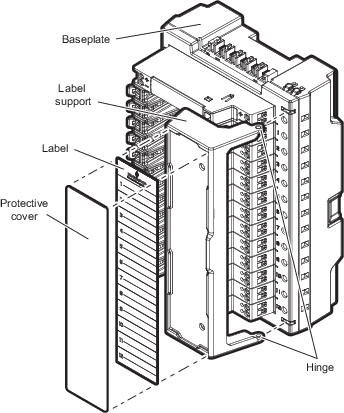
The CHARM labeling component
consist of a label support that holds a label and its protective plastic cover.
Remove the label support from the baseplate before writing or typing the CHARM
IDs on the label.
Note
The image shows the
labeling component on a CHARM Baseplate. If you are labeling I.S. CHARMs,
install the labeling component on an I.S. CHARM Baseplate.
Figure: CHARM labeling component
Press the label support at the top hinge and remove it from the
hinge post.
Lift the support off of the bottom hinge post.
The label support is now free of the baseplate.
Slide the protective plastic cover off of the label being careful
not to bend or fold it.
Slide the label from the label support being careful not to bend
or fold it.
Write or type the CHARM IDs in the preformatted areas on the
label.
Slide the completed label back into the
support from the top, being sure that the label passes under the label
retainers and is properly seated under the top and bottom corner tabs.
Repeat the previous step and insert the protective plastic cover
over the label.