Sample C# code, including a complete application, is included in the DeltaV installation in the directory: \DeltaV\samples\CampaignManager\WCFCMClient\.
The sample application also includes XML usage examples.
To use the sample application:
-
You must have .NET Framework 3.5 installed to use the samples. To easily add and modify service references to any Visual Studio 2005 project, we recommend installing the WCF Extensions for Visual Studio.
-
The Campaign Manager web service must be running.
-
One or more Campaign Managers and their respective Batch Executives must be running.
To set up the sample application:
-
Run CMSampleClient.exe in \DeltaV\samples\CampaignManager\WCFCMClient\bin.
NoteMake sure the *.config files in this directory are not read-only.
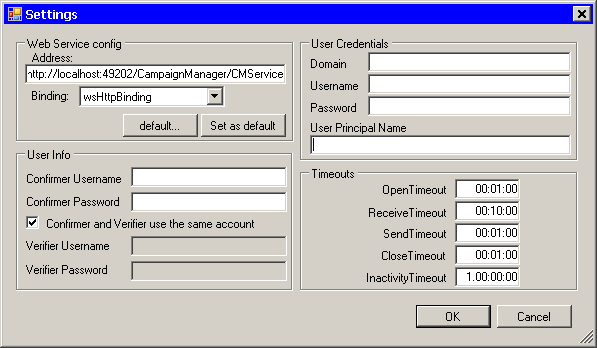
The Settings dialog appears.
-
Enter settings for your system.
Some tips:
-
Verify that the correct server name and port number are in the Address field.
-
After editing the Web Service config group, click Set as default to retain your settings the next time you run the client.
-
The User Credentials group contains the information used by the Connect method. The Username can be any batch user.
-
Set the User Principal Name:
-
-
Click OK. If your settings are accepted the sample client application appears. When you are using the sample client: