The supported configurations for using SOA web services from an external system are:
-
The SOA Gateway in a DeltaV system (domain or workgroup) connected to an external LAN. The addition of a firewall is recommended to protect the SOA Gateway.
The following figure shows a generalized example of an external system connected to a DeltaV system.
-
The SOA Gateway in a DeltaV system domain connected to a Secure SOA Server in another domain. The addition of a firewall is recommended to protect the SOA Gateway. The two domains must have a trust relationship.
The following figure shows a generalized example of a DeltaV system domain connected to an external domain.
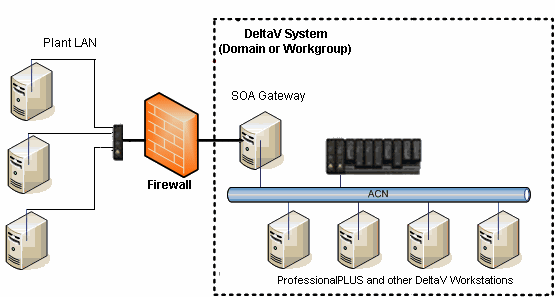
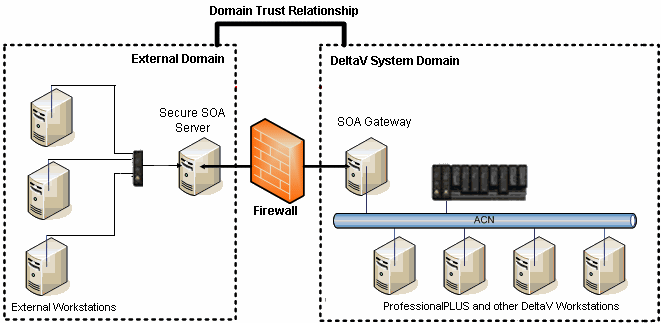
The computer labeled SOA Gateway is an application station on the DeltaV area control network (ACN). The gateway is the access point for all client programs using web services.
The general steps to set up SOA web services are:
-
Install DeltaV software on the computers in the DeltaV system.
-
Designate an application station as the SOA Gateway from the Physical Network Properties dialog.
-
Export the workstation configuration.
-
Move to the application station designated as the SOA Gateway.
-
If you are setting up the SOA Gateway application station for the first time, run Workstation Configuration on the application station. If the SOA Gateway application station was previously fully installed, skip to step 6.
-
Download the application station.
-
If you are using a firewall, configure it to enable the ports the services are using.
If you are using the SOA Gateway in a DeltaV domain and providing access to users in another domain, the general steps to set it up are:
-
Install DeltaV software on the computers in the DeltaV domain.
-
Designate an application station as the SOA Gateway from the Physical Network Properties dialog.
-
Export the workstation configuration.
-
Move to the application station designated as the SOA Gateway.
-
If you are setting up the SOA Gateway application station for the first time, run Workstation Configuration on the application station. If the SOA Gateway application station was previously fully installed, skip to step 6.
-
Download the application station.
-
Create a trust relationship between the two domains.
-
Move to the computer in the other domain that is going to be the Secure SOA Server.
-
Install the Gateway software.
-
If you are using a firewall, configure it to enable the ports the services are using.
In this implementation the DeltaV system must be configured as a domain, not a workgroup. The DeltaV domain is protected by a firewall and the only contact outside the domain is through the Web Service Gateway.