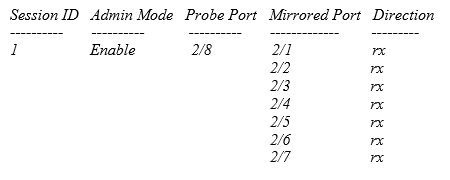
Ports are entered in the (media) module/port notation. Mirror to the switch's Probe Port.
This procedure uses the RM100 as an example. The command line prompt (Emerson RM100>) will vary depending on the switch model.
For older DeltaV Smart Switches, a firmware upgrade is needed (v8.0.13). This firmware upgrade exposes the switch's port mirroring capabilities.
-
Issue the following commands from the Command Line Interface
(CLI):
User: admin
Password:********
NoteEnter '?' for Command Help. Command help displays all options that are valid for the 'normal' command forms of that particular mode. For a list of valid 'no' command forms for that mode, enter the help command 'no ?'. For the syntax of a particular command form, please consult the documentation.
(Emerson RM100)>deltav monitor acn-wizard
Do you want to delete the current Port Mirroring Configuration? (y/n): y
Mirroring Session cleared.
Enter Probe Port e.g 1/1, current probe port is none: 2/8
Configured probe port is 2/8
Enter List of Mirroring Source Ports to be added: 2/1-2/7
Adding Mirroring Source Ports completed.
Current Mirroring Source Ports are: 2/1-2/7
Do you want to activate the current Port Monitor Session? (y/n): y
Mirroring Session is enabled
Do you want to save the current configuration? (y/n): y
Saving Configuration
(Emerson RM100) >show monitor session 1