There are two IOPs on the DeltaV PK controller: a primary (left side) network and a secondary (right side) network. Port 1 (top left) is always enabled and cannot be disabled (allows initial connection between the Engineering Station and the controller). Port 4 (top right) is enabled by default, but can be disabled.
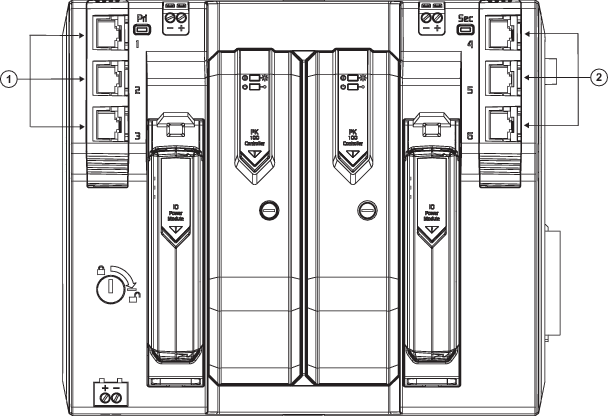
| Callout | Description |
|---|---|

|
Primary network side.
Ethernet ports 1-3. These appear in software as Network Portx. |

|
Secondary network side.
Ethernet ports 4-6. These appear in software as Network Portx. |
You can connect any port on the IOP to an external switch.
You cannot bridge the primary and secondary ports.
Simplex network operation mode is accomplished by using the ports on the left side of the DeltaV PK controller.
Redundant networking is accomplished using ports on both the left (primary network) and right (secondary network) sides of the DeltaV PK controller.
The DeltaV PK controller's port 1 is always enabled and therefore is the port you must connect to the first time you configure and commission the controller.
In DeltaV Explorer, configure the controller's PO1 to a valid IP address for your device network. Your controller must be communicating through PO1 using a valid IP address for devices connected to the enabled ports on the controller's IOP (the external Ethernet ports).
If you want to create device network placeholders without affecting the overall integrity of the controller or you want to avoid IP address conflicts while configuring the devices, leave this port disabled until your configuration is ready.