The Characteristic Filter region is used as a tool to visually highlight alarms with similar characteristics in order to more easily identify problem areas in the running process control system.
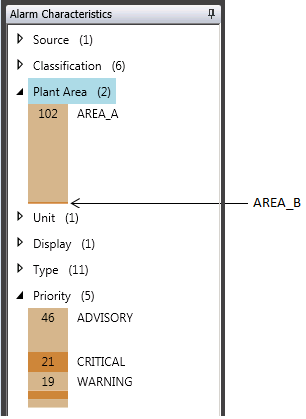
The number next to each characteristic indicates how many sub-items that characteristic includes. A sub-item is listed only if it contains alarms. When a characteristic is expanded, you see a bar graph listing the sub-items of that characteristic and a number inside each bar segment. The number inside the bar segment indicates how many alarms in that sub-item have that characteristic.
Within a parent characteristic (for example, Plant Area), the individual sub-items appear in descending active alarm count order from top to bottom and are displayed in alternate colors for easy identification. All sub-items are shown proportionally and are labeled when there is enough vertical space for the label text.
In the example below, Plant Area (2) indicates that there are two areas containing alarms. 102 AREA_A indicates that Area A contains 102 alarms. While Area B contains alarms, there is not enough vertical space to display the number or label. Calculations are done every 5 seconds, and every sub-item that has an active alarm count of one or more is included in the overall calculation for that characteristic.
-
Click on a sub-item to select it.
When a sub-item is selected, all alarms with that characteristic are highlighted in the Timeline Chart and Alarm List.
This allows you to quickly identify problem areas. - Right-click on a selected
sub-item and use the context menu to acknowledge all alarms within that
sub-item.
Note
If a sub-item under the Display characteristic has a Control Display, it can be opened from the context menu as well.
- Filter on characteristic sub-items
- Hover over a sub-item to see the label and count in a tooltip.