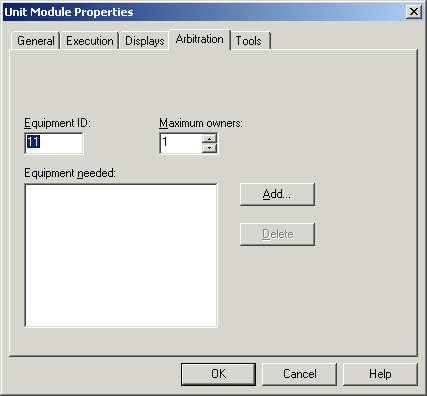
Defining unit module properties - arbitration
Use the Arbitration tab to manage the use of shared plant equipment by batch recipes.
Equipment ID: To define a unique ID for resources used in a Batch control, select an available number in the Equipment ID box in the range of 1 through 65535. The system uses equipment IDs to acquire and release resources. The number specified here can be referenced by the phase logic modules and unit phases. The resources that have IDs are: units modules, process cells, unit phases, phase logic modules, equipment modules and control modules. Control and equipment modules must have equipment IDs when used for Batch control.
Maximum owners: Specifies the number of requesters that can use this resource simultaneously. Enter the number in the Maximum Owners box.
The maximum number of owners setting defines the maximum number of requesters that can simultaneously use the resource. By default, this number is set to one, which is sufficient for most applications. Increasing this number allows multiple requesters to use the resource simultaneously.
Setting Maximum Owners on the unit module's unit phases to any value greater than 1 is not recommended as a phase cannot be successfully run by multiple owners at the same time.
Equipment needed: Displays the resources used by this resource. Before this resource can be acquired, it must first acquire all the items in Equipment Needed.
Add button: Adds a resource to the list. Click Add and browse for all the valid options. The valid options include unit modules, unit phases, phase logic modules, equipment modules and control modules.
Delete button: Deletes a resource from the list. Select the resource on the list and click Delete.
Unit Module Arbitration Properties