Example send message to an operator, direct
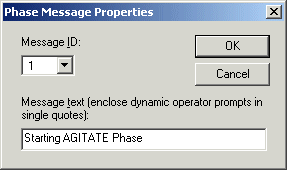
As an example, you want the "Starting AGITATE Phase" message sent to the operator when the phase starts. To do this, create a phase message using DeltaV Explorer with the text "Starting AGITATE Phase", and record the phase message ID (1 for this example).
Phase Message Properties Dialog
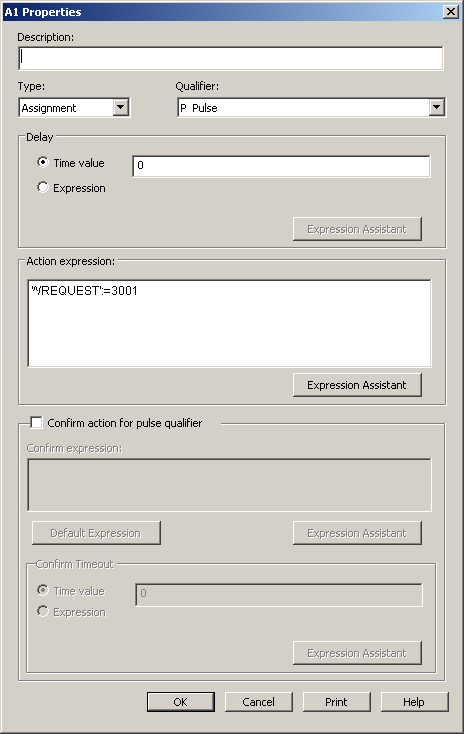
In the logic for that phase, select the Running state. Write the action for the step to call phase message ID number 1. The action should have a Type of Assignment and a Qualifier of Pulse. The phase register is 3001, where 30nn is the request "Send Message to the Operator" and 01 is the ID of the phase message created in DeltaV Explorer.
Direct Phase Message Step Action
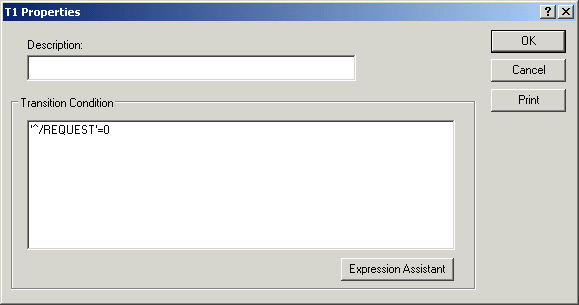
In the following transition, write an expression that waits for the REQUEST parameter to clear before moving to the next step.
It is very important that your phase waits for the Phase Request to be completed, as signified by the REQUEST register returning to 0, before issuing another request. If you fail to do this, the requests may fail. Always follow any step that writes a value to REQUEST with a transition expression that waits for 'REQUEST' = 0. For some types of request, such as the "Acquire Resource" request, this could result in a lengthy wait.
Phase Message Transition Expression
Now, when the phase starts, the message "Starting AGITATE Phase" is displayed to the operator.