Setting a default value and range
Once you select the parameter type, enter the parameter's value range and default value. The parameter's value range does not need to match its deferred parameter's value range. When this situation occurs, only the values common to both the recipe parameter and the associated step parameter are valid. This effect is cumulative as you proceed up the procedure hierarchy.
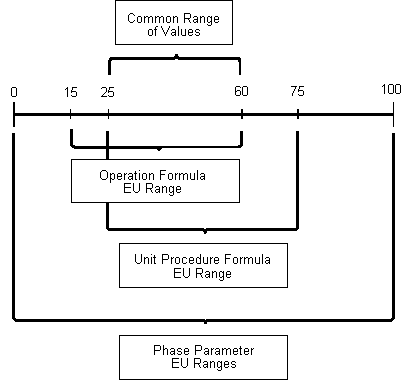
For example, assume you need to create a recipe parameter for the phase parameter AMT_TO_ADD. This value will be deferred from the operation up to the unit procedure level. Assume the phase parameter's value range is 0 to 100. Also assume the ranges of two recipe parameters are as shown in the following table.
|
Recipe Parameter |
EU Range |
|---|---|
|
Operation |
15 to 60 |
|
Unit Procedure |
25 to 75 |
The range of values that is common to the unit procedure, the operation, and the phase is 25 to 60. The following figure illustrates how this works.
Value Ranges