UPh_fp (Unit Phase function block faceplate)
Configuration view of the Unit Phase function block faceplate (UPh_fp)
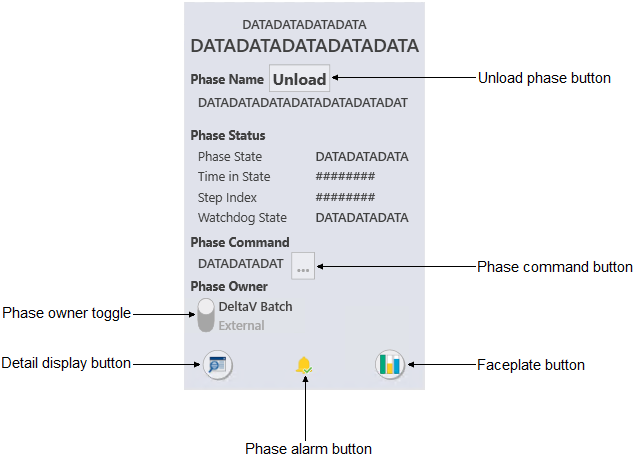
The UPh_fp is used with unit
phases. The following list describes the major components that are present on
the UPh_fp.
- Phase name
- Shows the name of the active phase.
- Unload phase button
- Unloads the phase when it is IDLE.
- Phase status
- Shows the current status for the phase, along with the following
information:
- Phase state
- Shows the current state of the phase.
- Time in State
- Shows the time elapsed since the current state began.
- Step Index
- Shows, as a number, the current step of the phase.
- Watchdog State
- Shows the current state of the watchdog.
- Phase command
- Shows the current phase command.
- Phase command button
- Opens a list of Batch commands.
- Phase owner toggle
- Click to change the phase owner.
- Detail display button
- Open the module detail display.
- Phase alarm button
- Acknowledges the alarm for the active phase.
- Faceplate button
- Opens the module faceplate display.