Holding a batch
Holding a batch temporarily stops operation of the batch and transitions the batch to the Held state. Generally, the Held state is a safe state that is determined by the plant engineering and operations group.
A batch can also automatically go into the Held state if a device failure is detected by the DeltaV system.
You can hold batches when they are in the:
-
Running state
-
Restarting state
The following figure shows a batch that received a Hold command while in the Running state.
Holding a Batch
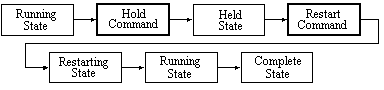
For example, in the paint recipe there is a scheduled prompt sent to the operator. This prompt requests a value that the operator obtains from taking a test during the QA_TEST phase and evaluating the pH level of the batch. Typically, the operator enters that value and batch production continues.
A supervisor can then place the batch into the Hold state to verify the results of the operator's test. Once the supervisor has verified the results, the batch is placed in the Restarting state.