PLM_dt (Phase Logic Module detail display)
Configuration view of the Phase Logic Module detail display (PLM_dt)
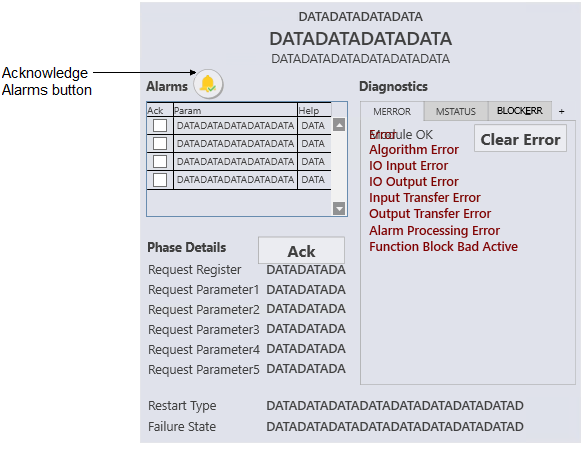
The PLM_dt is used with the Phase Logic Module. The following sections describe the major components that are present on the PLM_dt.
- Alarms
-
- Acknowledge alarms button
- Acknowledges all alarms on the module.
- Alarm list (active)
-
Provides a condensed version of an alarm summary and scrollable list of the module's current active alarms.
- Ack column --> Shows the state of the alarm, which is
represented by one of the following symbols:
Alarm state Ack column Active/unacked Empty field Active/acked Check mark Inactive/unacked Empty box - Module/Param columns --> Shows the module name and parameter name, respectively. The text and colors are as configured for the alarm's current state.
- Help column --> Indicates the type of Alarm Help available
for the corresponding alarm. The column contains one of the following icons:
Icon Description 
Alarm Help is enabled. 
Alarm Help is not enabled but the user has the privilege to edit Alarm Help. No icon Alarm Help is not enabled and the user does not have the privilege to edit Alarm Help, or the system does not have a license for alarm help.
- Ack column --> Shows the state of the alarm, which is
represented by one of the following symbols:
- Diagnostics
-
- Diagnostics table
- Shows any active conditions in the module's MERROR, MSTATUS, and BLOCK_ERR parameters. Each parameter has its own tab, and the parameter name is underlined on the tab when an active condition exists for that parameter. Click the parameter's tab to see its active conditions. When an error has occurred in the module, a Clear Error button appears on the MERROR tab. Click this button to clear all active errors.
- Phase Details
-
Provides the phase details, including the request register, request parameters 1 through 5, restart type, and failure state.
- ACK button
- Manually acknowledges and clears the phase requests.