Batch Historian
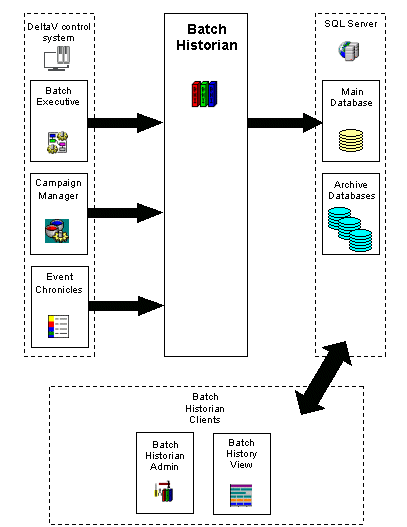
A DeltaV Batch Historian receives data from the DeltaV control system and saves that data to a SQL database. Several client applications make the data available to users. The figure below shows how information flows into and out of the Batch Historian.
A Batch Executive is the source of recipe execution information. As a batch executes, batch events generated by the Batch Executive are passed to the Batch Historian. The Campaign Manager is the source of campaign execution data. Like Batch Executive, Campaign Manager automatically feeds campaign-related events to the Batch Historian for storage. The Event Chronicle is the source of process-related alarms and events, including operator changes, system messages, and user-defined events. The Batch Historian copies this data into the main database so that process data can be included in batch reports and queries.
Up to four Batch Historians can be enabled in a DeltaV system. A single Batch Historian can receive events from multiple Batch Executives and Campaign Managers; however, Batch Executives and Campaign Managers can feed their events to only one Batch Historian.
Data stored in the Batch Historian database is viewed using Batch History View.
Information Flow in the Batch Historian
Data received and stored by the Batch Historian includes:
-
Product and recipe identification
-
Formulation data and relevant changes
-
Procedural element state changes (Operations, Unit Procedures, Procedures)
-
Phase state changes
-
Operator changes
-
Operator prompts and responses
-
Operator comments
-
Equipment acquisitions and releases
-
Equipment relationships
-
Campaign creation data (recipe, formula values, equipment, and so on)
-
Campaign modifications
-
Campaign execution activity
-
Controller I/O subsystem events from the Continuous Historian
-
Process alarms
-
Process events
-
Device state changes
-
Unexpected or unrecognized messages from the Batch Executive or the Continuous Historian
-
Batch Analytics model name, version and deploy date for a batch that was monitored by Batch AnalyticsNote:If Batch Historian is shut down during the time a running batch is being monitored, the model name and version will not be captured in the Batch Historian database.