Output configuration
After enabling the Batch Historian you must identify the storage locations, which are the Batch Historian databases.
Output Properties of the Batch Historian
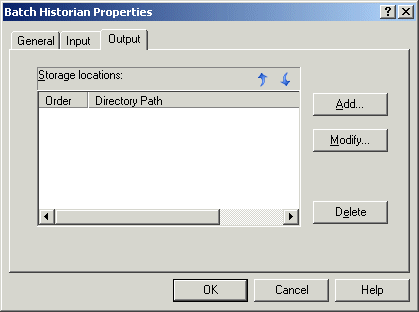
The Batch Historian Output dialog is part of its Properties dialog. Here you can create new and view current storage locations for the Batch Historian data (the SQL database locations). You can also modify the properties of a Batch Historian database or delete an existing database configuration (the database remains, but this Batch Historian will no longer write to that location. To administer the Batch Historian databases, use the Batch Historian Administration Tool.
Follow these rules when selecting your Output storage location:
-
The directory used for Output storage must be on the Batch Historian's local drive (that is, on the same machine as the Batch Historian).
-
Use caution when entering mapped drives. The workstation might not have the same mapped drive letter and SQL does not support mapped drives for its database components.
-
If you use the Browse button, you must browse to the Network Neighborhood and select the machine name (the same machine as the Batch Historian).Note:
SQL Server does not accept a drive letter UNC path; for example, \\nodename\c$\DVBatchHistoryData. If the location is a shared path, SQL Server requires the UNC path to be \\nodename\DVBatchHistoryData.
-
The default path is \\DVBatchHistoryData\.
-
It is recommended that the output directory path not be in the \DeltaV or \DVData paths. During a DeltaV upgrade, the DeltaV paths are renamed (or deleted) and the Batch Historian will no longer be able to find the directory configured.
Adding a Storage Database in the Batch Historian
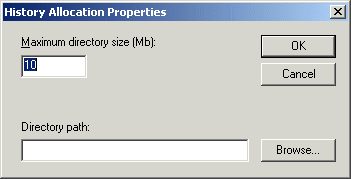
If you are adding a new storage location, specify the maximum directory size and the directory path of the storage location. Click the OK button. The new storage location is displayed in the storage locations list.
Once the output database path is configured, the workstation downloaded, and the Batch Historian started, the space allocated is immediately reserved for the Batch Historian and cannot be used for any other purpose.
The Batch Historian allocates 3% of the space in each storage database for administrative overhead. Therefore, the Batch Historian stops recording on a single storage database when it reaches 97% of the space allocated. The Batch Historian continues recording in the other storage databases until all the storage databases reach 97% capacity, at which time the Batch Historian stops recording any data.
When the total database usage exceeds 80% of the allocated size of all the output databases combined, DeltaV Diagnostics shows the Batch Historian subsystem's overall integrity as Bad. This serves as an early notification to the user that an additional database must be created before the total database usage reaches capacity. At that point, the Batch Historian will run out of total database space and cease to store data. The Batch Executive will continue to generate events and buffer them to the Batch Historian's database in the .evt files.