Equipment definition > Unit classes and unit modules > Creating unit modules

Create the BLENDER unit modules

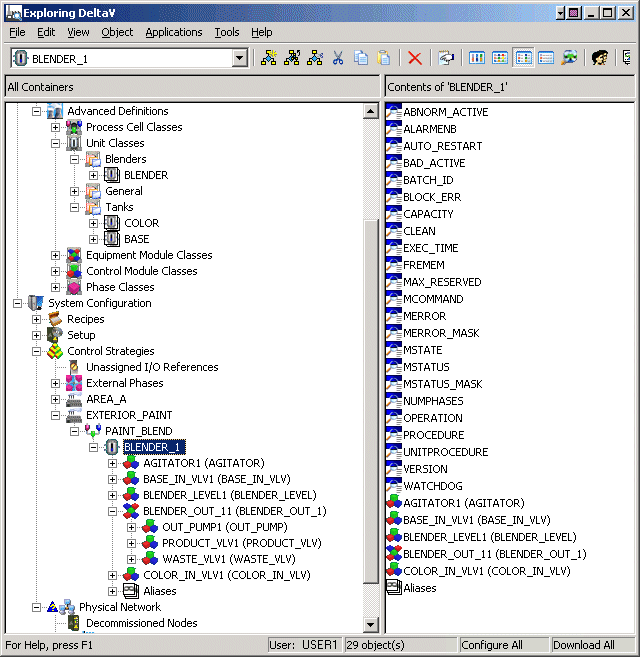
  1. Drag the BLENDER unit class to the PAINT_BLEND process cell under EXTERIOR_PAINT area  in the System Configuration/Control Strategies section of the DeltaV Explorer.  A unit module, BLENDER_1, is created.
  2. Expand BLENDER_1 and the contained equipment module, BLENDER_OUT_11, to see the contents.

    The unit module contains module blocks for four control modules (AGITATOR1, BASE_IN_VLV1, BLENDER_LEVEL1, and COLOR_IN_VLV1); the equipment module BLENDER_OUT_11 contains control modules OUT_PUMP1, PRODUCT_VLV1, and WASTE_VLV1.
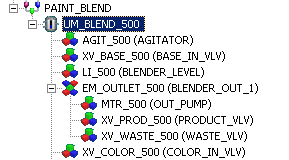
  3. Rename BLENDER_1 to UM_BLEND_500.
  4. Rename AGITATOR1 to AGIT_500.
  5. Rename the remaining modules as shown below: 
  6. To create the UM_BLENDER_600 unit module, drag another copy of the BLENDER unit class to the PAINT_BLEND process cell.
  7. Rename the resulting module instances as in steps 3 through 5 above, but substitute 600 for 500 in all the module names.