Equipment definition > Unit classes and unit modules > Creating unit modules
Create the COLOR unit modules
-
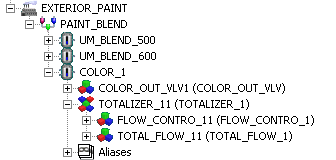
Drag the COLOR unit class to the PAINT_BLEND process cell. Expand the COLOR_1 unit module and the contained equipment module, TOTALIZER_11 to see all the module instances contained within the unit module.
-
Rename COLOR_1 to UM_COLOR_100.
-
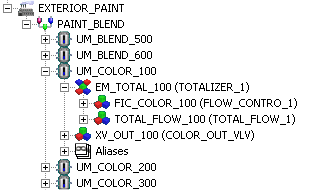
Rename the remaining modules under UM_COLOR_100 as shown in the figure below.
-
To create the UM_COLOR_200 and UM_COLOR_300 unit modules, drag two more copies of the COLOR unit class to the PAINT_BLEND process cell.
-
Rename the resulting module instances as in the figure below, but use 200 and 300 (for UM_COLOR_200 and UM_COLOR_300, respectively), in all the module names.