Equipment definition > Unit classes and unit modules

Add module classes to unit classes

At this point we have all the control module classes and equipment module classes we need for the application. In earlier exercises, we created unit classes (COLOR, BASE, and BLENDER) to hold the control modules and equipment modules for the color tank units, base unit, and blender units. Now we will add the required module classes to these unit classes. The easiest way to do this is to drag the control module class (or equipment module class) to the unit class and then rename the resulting module blocks to more meaningful names. Note that when you rename the module block, the associated alias is also renamed.
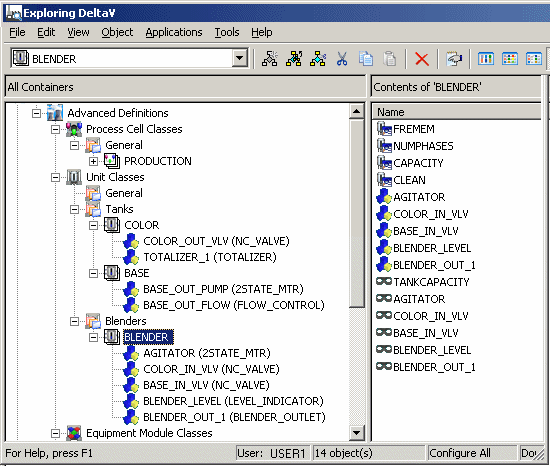
  1. Drag the following module classes to the BLENDER unit class and rename them as indicated: 2STATE_MTR (rename to AGITATOR) NC_VALVE (rename to COLOR_IN_VLV) NC_VALVE (rename to BASE_IN_VLV) LEVEL_INDICATOR (rename to BLENDER_LEVEL) BLENDER_OUTLET (leave the name as BLENDER_OUT_1).
  2. Drag the following module classes to the BASE unit class and rename them as indicated: 2STATE_MTR (rename to BASE_OUT_PUMP) FLOW_CONTROL (Rename to BASE_OUT_FLOW).
  3. Drag the following module classes to the COLOR unit class: NC_VALVE (rename to COLOR_OUT_VLV) TOTALIZER (leave the name as TOTALIZER_1).
  4. Click the BLENDER unit class.
    Note that in addition to module blocks that represent the control module classes and equipment module class, the unit class also contains aliases (marked by a mask icon) that have the same names as the module blocks.