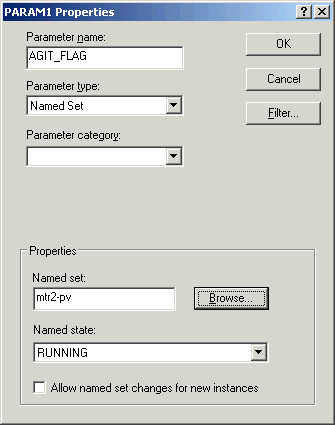
Normally, you will want to add phase algorithm parameters at the phase class level. However, you can create a parameter for an active state such as the running logic. For the AGITATE running logic you will create a phase algorithm parameter (AGIT_FLAG) that will be used to keep track of whether or not the agitate motor is supposed to be running.
- Name the parameter AGIT_FLAG, specify a parameter type of named set, browse for the named set mtr2-pv, and select a state of RUNNING.
-
Click the Main button
 , and then click Save to save the phase.
You can now browse for AGIT_FLAG when you create the step actions, two of which will reference this parameter.
, and then click Save to save the phase.
You can now browse for AGIT_FLAG when you create the step actions, two of which will reference this parameter.