In Recipe Studio, click the Main button, and then click New. Select Procedure as the recipe object type.
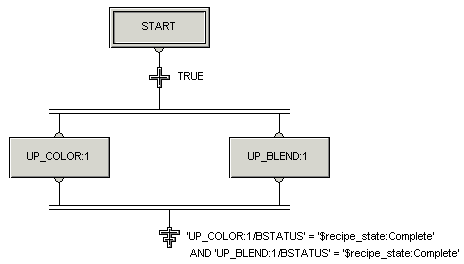
Create the procedure as shown in the following diagram.
Important
On the Properties dialogs for UP_COLOR and UP_BLEND, do not select the Acquire unit prior to starting unit procedure check box. This allows each unit procedure to be started individually as soon as the unit it needs is available.
Right-click the Diagram view, then click Properties and fill in the other fields on the Properties tab.
Save the procedure as PRC_PAINT.
In DeltaV Explorer, assign the procedure recipe to the Batch Executive, and then download.