Equipment definition > Areas and process cells

Create a process cell

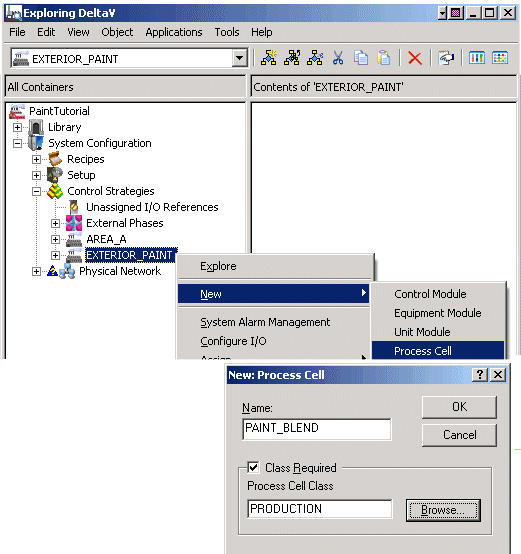
  1. In the DeltaV Explorer, click System ConfigurationControl StrategiesEXTERIOR_PAINT.
  2. Right-click and select NewProcess Cell from the context menu.
  3. Name the new process cell PAINT_BLEND. Check the Class Required box and browse for the process cell class PRODUCTION. (In the Browse dialog, double-click General and then double-click PRODUCTION to select it.)
Note

An easier way to create a process cell from a class is to drag the PRODUCTION process cell class to the area, EXTERIOR_PAINT, which creates a process cell named PCELL1. You can then rename PCELL1 to PAINT_BLEND. From this point on, we will use the drag-and-drop method when available.