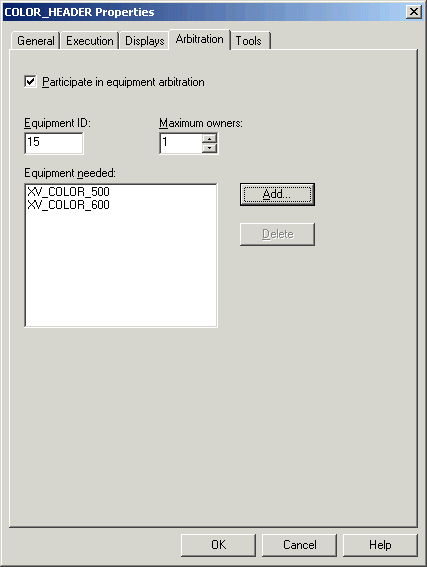
Now, you will create a control module called COLOR_HEADER in the PAINT_BLEND process cell and modify its properties to add XV_COLOR_500 and XV_COLOR_600 to its Equipment Needed list.
In DeltaV Explorer, right-click the PAINT_BLEND process cell and select New → Control Module from the context menu.
Name the new control module COLOR_HEADER. (Leave the Algorithm type as Function Block Diagram.)
Open the COLOR_HEADER Properties dialog.
On the Arbitration tab of the Properties dialog, select the Participate check box in equipment arbitration.
Note the Equipment ID, which is 15 in the example below. You may have a different number, which you will need to substitute for 15. This ID will be used later in requesting the resource.
In the Equipment Needed list, add XV_COLOR_500 by clicking Add and browsing in EXTERIOR_PAINT → PAINT_BLEND → UM_BLEND_500 for the control module.