The simplest and most revealing method of debugging is advancing by single-steps through the diagram from one block to the next. As you advance from one block to the next, Control Studio highlights your location in the diagram using a yellow arrow.
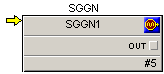
While you are advancing through the diagram, you can observe the inputs and outputs of the function blocks, and verify that you are getting the output values you expect. When you are debugging an algorithm, try to identify the block that does not have the behavior you expected, and start your troubleshooting with that block.
When you have a composite block on your diagram, you can Advance In to the composite to see the blocks or steps the composite contains. If you do not want to look at the details of the composite, you can Advance Over a composite. When you advance over a composite, Control Studio treats the composite as a single block on the diagram instead of a group of multiple blocks, and advances to the next block in the diagram at the current level.